
From the Agent Role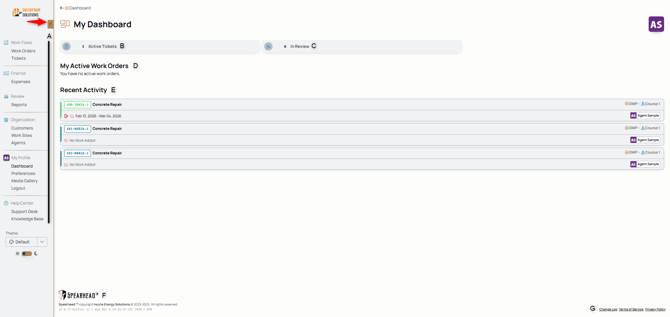
A This is the navigation panel, also referred to as the nav menu, is what helps you get around Spearhead. Use the collapse icon (the red arrow) to expand or collapse the nav menu. Learn more about the nav menu here.
B This is the card that displays your active tickets, use this to see what work has been assigned to you, either complete or incomplete.
C This is the card that displays the tickets you've submitted for approval that are currently in review.
D This displays open, active work orders for your dedicated customers. You can use the add ticket icon to create a ticket for that open work order.

E This displays all recent activity for your tickets.
F This displays the version and update number of your version of Spearhead. Some issues in Spearhead can be resolved with a simple update and this tells you when the last update was.
G Follow this link to find the changelog, the detailed list of features and updates documenting every version of Spearhead.
From the Backoffice Role
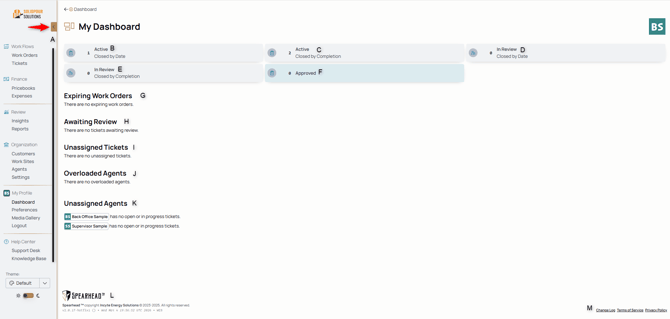
A This is the navigation panel, also referred to as the nav menu, is what helps you get around Spearhead. Use the collapse icon (the red arrow) to expand or collapse the nav menu. Learn more about the nav menu here.
B This is the card on the dashboard that displays and shows the number of how many active CLOSED BY DATE work orders there are under your purview. Whether you made them or agents dedicated to those customers did, you'll find those active tickets listed and counted here.
C This is the card on the dashboard that displays and shows the number of active CLOSED BY COMPLETION work orders there are under your purview. Whether you created them or agents dedicated to those customers did, you'll find those active tickets listed and counted here.
Want more clarification for these two different types of tickets? Check out page for work orders.
D This is the card on the dashboard that displays tickets that have been submitted for review. This is the card that contains the number and section for CLOSED BY DATE.
E This is the card on the dashboard that displays tickets that have been submitted for review. This is the card that contains the number and section for CLOSED BY COMPLETION.
F This card contains all archived tickets that have been submitted for review, accepted, and approved.
G This is where you can find work orders that are approaching their pending grace periods, near the end of their time windows for generating, approving, and accepting tickets.
H Use this section to view all the tickets that have been submitted for review, including the submission date and the agent submitting the work.
I Tickets that have been created but remain unassigned are displayed here.
J This displays agents who are approaching their overloaded limit, as set in your organization settings.
K This displays agents who have no assigned tickets, work, or work orders.
L This displays the version and update number of your version of Spearhead. Some issues in Spearhead can be resolved with a simple update and this tells you when the last update was.
M Follow this link to find the changelog, the detailed list of features and updates documenting every version of Spearhead and changes that have gone into effect.