
You can only add a worksite from a customer's profile because all worksites are associated with a customer.
1. From your nav menu, select Customers under Organization.
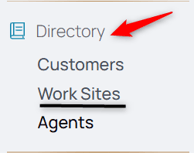
2. Select the customer.
3. From the middle menu, select Worksites.
4. Click the Add New icon.

5. Enter the new worksite's details.
6. Click Create Work Site to add the worksite to the customer.
Unconfirmed Work Sites
To learn more about unconfirmed worksites, check out this reference article about Unconfirmed Worksites.
Tickets are not worksite restricted, an agent can create a ticket or log to an unconfirmed work site. It appears with this red icon to indicate it hasn't been confirmed yet.

As a backoffice user, several options appear when a worksite is not confirmed:
1. From the nav menu, under Operations click Tickets.
2. Find the ticket with the unconfirmed worksite.
3. Hover over the unconfirmed worksite or temporary name and icon.
4. From there, you'll encounter a popup.
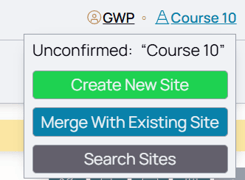
The options are as follows:
Use Create New Site when you know the worksite doesn't exist, follow this to create a new worksite for the customer of this ticket.
Use Merge with Existing Site to find potential overlap or matches and find an existing site that has been created that is duplicative of this site. Once there, you can merge this unnamed worksite and all its activity with that existing worksite.
Use Search Sites if you're unsure if the worksite exists or not.