
If you'd like to learn more about what agent tiered pricing is and how it impacts your organization settings, click here.
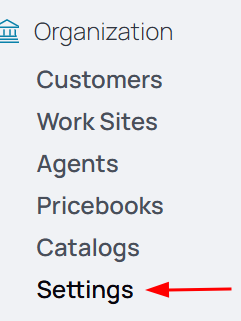
1. From the nav menu, select Settings under Organization.
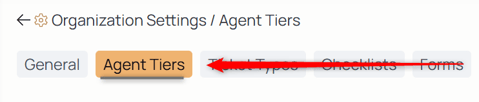
2. From the middle menu select Agent Tiers.
3. Use the Add button to create a new tier.

4. Select the Title field and type the name of this asset tier.
5. Give a brief description for this tier that details the type of work or job title of the employees that fall under this tier.
6. Select the Submit button to create this tier.
NOTE: To begin using this agent tier, you must assign prices to it first.
7. From the nav menu, select Pricebooks under Organization to assign prices.
8. Select the pricebook this agent tier falls under.
9. From the middle menu, select Agent Tiers:

10. Select the Edit icon to add prices:

11. Select the Calendar icon to modify the date at which this pricebook went into effect:

12. Enter the rates in the given fields that will then apply to all agents in this tier.
13. Select the Save button to put these changes into effect:
