
Note: It is recommended that you have quantity units (grams, ounces, feet, etc.) established before adding services to your catalog, so you can easily assign quantity units to products as you add them to the catalog. Follow this guide here for How to Set up Quantity Units for Catalog Additions or this reference article about Quantity Units.
1. From your Nav menu, select Catalogs under Offerings.
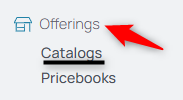
2. Choose the default catalog or a specific catalog you'd like to modify or add products/services to.
3. Click the Add Product button.

4. Select the Product Title field and enter the name.
5. Click the Description field and provide a detailed description for the product.
6. Select the quantity units (e.g. feet, inches, etc.) to be used with this product. Note that you can apply multiple quantity units to each item if you intend to price different quantities at a separate price. (I.e. you charge $1 / feet, but offer a discounted price of $2 / yard.)
7. Select Submit to add the product to the catalog.
8. Select Services.
9. Click the Add Service button.

10. Select the Service Title field and enter the name.
11. Click the Description field and provide a detailed description for the service.
12. Select Submit to add the service to the catalog.
Edit Prices in Pricebooks
Once your products and services are in your organization's catalog, you can now edit their prices.
1. From the nav menu, select Pricebooks under Offerings.
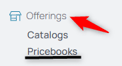
2. Select the Pricebook to which the catalog item(s) were added.
3. From products, select the price field to edit an existing price or the "not set" field if a price hasn't been added.

4. From there, you can edit or delete the price of the item. To add a new price with a new effective date, to keep the price record intact, click the New Price which brings up a new line of pricing.

5. Select the numerical field, enter the updated or new price.
Note that you can apply multiple quantity units to each item if you intend to price different quantities at a separate price. (I.e. you charge $1 / feet, but offer a discounted price of $2 / yard.) If more than one quantity unit is checked on an item, be sure to price all quantity units.
6. Change the effective date if needed, it can be retroactive or post-dated.
7. Submit the price.
8. To modify or add a price to services, select Services from the middle menu.
9. If there is no price listed or to edit the price, select the "not set" field.
10. From there, you can edit or delete the price of the service. To add a new price with a new effective date, to keep the price record intact, click the New Price which brings up a new line of pricing.
11. Select the numerical field, enter the updated or new price.
12. Change the effective date if needed, it can be retroactive or post-dated.
13. NOTE: All services are priced per hour.