
To Archive/Reinstate as an agent:
1. Using the nav menu, select Tickets under Operations. Or find the ticket from your dashboard.
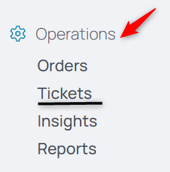
2. Select the ticket.
3. Delete the log in question by hovering over it and selecting the Delete button. There will be a verification dialog box, ensuring you really want to delete the log in question.

4. To retrieve that log, go to the Archived Work tab of the ticket.

5. Find the log in question.
6. Hover over it to reveal the Reinstate button.

7. This reinstates the log directly into the ticket's activity log.
To Archive a Ticket as Backoffice
1. Using the nav menu, select Tickets under Operations. Or find the ticket from your dashboard.
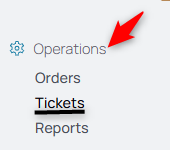
2. Select the ticket or use the search function to find it.
3. From the right hand corner, select the More menu options.

4. Select Archive from the relevant options.
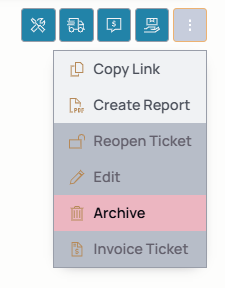
NOTE: Tickets with unarchived logs cannot be archived. A ticket cannot be archived if it has completed logs or forms on it. Clear the logs or forms for the Archive function to be enabled.
To view an archived ticket, expand the search flags and choose All or Archived.
