
Before items (products or services) can be added to tickets and invoived and inventoried, they need to be added to the catalog. Your catalog is made up of all your organization's products and services. They can then be universally or uniquely priced via the Pricebook to be added to tickets.
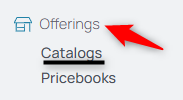
1. From your nav menu, select Catalogs under Offerings.
2. Select the Create New Catalog button in the upper right hand corner.

3. Name the catalog.
4. Add any details to this notes field. Examples of products or services contained therein.
5. Select Submit to create the new catalog.