
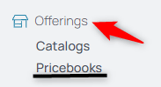
From the nav menu, go to Pricebooks under Offerings.
2. Select the Pricebooks that contains the agent tier you intend to edit.
3. From the middle menu, select Agent Tiers:

4. Select the Edit icon next to the tier you're editing.

5. From the Pricebook details list page, select the Add icon to Create a New Rate.

6. Select the Effective Date field using the calendar icon. This way prices can be impacted retroactively or ahead of time.

7. Select the date to which you are changing the current selection. It can be retroactive or post-dated for it to go into effect in the future.
8. Type the daily, labor, travel, overtime, and mileage rates to which you are changing the current selection.
9. Select the Save button to submit the changes.
