
Desktop
1. On the Nav menu, underneath the Theme dropdown, is a toggle.
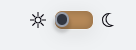
2. Sun on the left. Moon on the right.
3. To switch from dark to light, move the toggle from the right to the left.
4. To switch from light to dark, move the toggle from the left to the right.
Mobile
1. On the Nav menu, select the Settings gear.
2. Scroll all the way down under the Theme drop down, see the toggle.
3. Sun on the left. Moon on the right.
4. To switch from dark to light, move the toggle from the right to the left.
5. To switch from light to dark, move the toggle from the left to the right.