
Desktop
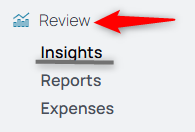
1. From the nav menu, select Insights under the Review tab.
2. Choose the Ticket Type from the dropdown field. 
3. Choose the time range.
4. Choose the Categories to compare or analyze.
5. Use the Percentiles boxes to break down the info. To not show the percentiles, use the toggle in the lower right to switch them on and off.

6. View the comparative analytical data below.