
Quantity units are set up by your backoffice to add clarity to your organization's pricebooks and catalogs. Add quantity units before adding any items to your catalogs or pricebooks.
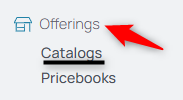
1. From your nav menu, Catalogs under Offerings.
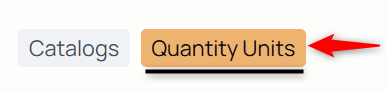
2. From the middle menu, select Quantity Units.
3. Select the Add New Unit icon.

4. Fill in the unit's title, abbreviation, and appearance.
Note: The parentheticals provide an example for how it will be used.
5. Click Submit to attach this unit of measurement to your organization's settings.