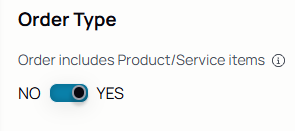
Role: This establishes the limits of your capability, visibility, and access within Spearhead as determined by the administrator who set up your profile.
- Admin: Leader within a Spearhead organization that has complete visibility across all levels.
- Back Office: Manager in charge of assigning work to agents based on client demand.
- Agent: A field tech or employee of a Spearhead organization that does field services work.
- Dedicated Agent: Field user that's associated to a specific client so as to be easily assigned work for that particular client.
- Assigned Agent: Field user that's assigned to a specific ticket instead of client or organization.
- Supervisor: Employee of a Spearhead organization that facilitates the creation and distribution of work, while also still able to perform work on tickets themselves.
Overloaded Agent: Based on a criteria set by supervisors when integrating Spearhead, an overloaded agent is one who has worked hours over a predetermined criteria. Like if a workday is 8 hours, anyone who logs more than that is considered "overloaded."
Use these colors in reference to "normal" shifts, to make the employee's time visibility clear for scheduling from their dashboard.
This is an example of an overloaded agent:
.jpeg?width=670&height=137&name=Overloaded%20Agent%20Timesheet%20(1).jpeg)
While this is an example of an agent that rarely exceeds shift parameters:

Customer: Client of the organization using Spearhead.
Organization: Client and user of Spearhead.
Dashboard: Homepage to view the user's aggregated data (e.g. timesheets, tickets, etc.)
Customer Dashboard: Homepage to view customer's aggregated data (e.g. agents, work sites, contracts, etc.)
Expenses: Costs incurred by an agent when performing a job that are then billed back to the client.
-
- Travel: Costs for transportation to a work site, car rentals, etc.
- Lodging: Costs of out of town rooms when an agent stays overnight on a job.
- Food and drink: Payments for meals made while on a job.
- Equipment: Tools, repairs, and replacements needed for work to be completed.
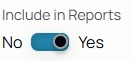
Expenses can be included or excluded from reports using the toggle:

Media: Proof of work that can be directly attached to a ticket and put into the worklog:
-
- Photos: Receipts for expenses, gauges of equipment, serial numbers for parts.
- Videos: Instructions, equipment in operation.
- PDFs: Guides, manuals, certifications, forms to be signed.
Media is visible when attached to a ticket, viewed in a report, or through the agent's media library on their agent profile.
E-signatures: Proof of work captured by a signature that can then be attached to a ticket. You can enable client signatures by editing a customer profile and enabling or disabling them on subsequent tickets.
- Proof of service
- Proof of delivery
They appear in this part of a ticket's menu:

Notifications: How a Spearhead user is alerted to updates about their tickets and jobs. Notification preferences can easily be changed from the user's Spearhead settings.
- Push: A notification that pops up on the user's device even when Spearhead isn't open.
- Email: Email updates are sent to the user's email inbox instead of their device.
Work Site: Site of an organization.
Unconfirmed Work Site: As indicated by these icons, an unconfirmed worksite that's not officially confirmed as belonging to a customer. An unconfirmed worksite functionality exists so not being sure if a worksite exists doesn't bar the creation of a ticket or logging of a work on a ticket. It can be resolved by merging the unconfirmed site with an existing worksite or creating one and all of the work for it and associated unconfirmed worksites then belong to that newly confirmed worksite.


Work Orders: Necessary first step for ticket creation. There are two separate classifications for work orders, as dictated by what determines their resolution.
- Closed by Completion: A work order that ends as soon as the tickets within it have been approved.
- Closed by Date: A work order that ends on a set date and can have as many tickets attached to it.
Tickets: Created by an admin user to outline and provide the details of a task for an agent. As work is performed, an agent logs work in the activity of the ticket. A ticket acts as a record that can be easily referenced by anyone at any point in the workflow, even clients through reports.
Quantity Units: Appear under the catalog and Offerings section of your nav menu. These populate on services and products to provide multiple quantity units (e.g. feet, inches, gallons, etc.). Manage quantity units in the Catalog and each additional item added to your catalog allows you to choose which quantity unit is tied to item or items.
Order Items: Items or services that are added to work order/tickets. They are items and services that have been added to a catalog and priced in a customer pricebook. They then populate on that customer's work order form when this section is selected:
Select items or services using these icons:

Reports: Compilations of collated data for different purposes:
- Ticket reports: Shows all the activity on a ticket, including multiple agents who have collaborated on it and the media attachments automatically generated with Spearhead.
- Employee reports: shows all of an employee's time and can view with multiple filters like by client, job site, and task.
- Service reports: Compiled report of sites from the worksite or agent profile.
- Expense reports: Compiled report of costs associated with tickets, clients, or jobs.
Timesheets: A view of hours performed by an agent. Compiled work easily used to generate an employee report or invoice.
Workflow: Clear chronology of work as it travels across departments
Gives you a process that provides visibility and accountability.
- Generation: a ticket or work order is created based on client demand.
- Assigned: distributed to a dedicated agent responsible for the completion of the work.
- Performed: the work is done on a job site and logged in Spearhead.
- Review: the ticket is submitted for review by supervisor.
- Approval: the ticket and work/expenses associated with it are accepted.
- Attributed: Work and its relevant cost associations has been attributed to a client and reflected on an invoice (expenses, timesheets, etc.).
- Processed: Invoice has been delivered and payment accepted.
Payment Cycle: The cycle that depicts the generation of an invoice, sending, and eventual collection of payment.
Ticket Submission:
- Review: ticket, expenses, and timesheets that have been submitted by the agent responsible for them for verification and validation by the backoffice. Once a ticket is submitted for review, all work on it is disabled unless it is reopened or the review is canceled.
- Approve: After submitted for review, a ticket or timesheet is accepted as true and error-free to proceed through the workflow or payment cycle.
- Rejection: After submitted for review, a ticket can be rejected due to erroneous or contradicting data. Once backoffice rejects it, it is entered back into the agent's workflow with comments dictating what needs to be corrected for it to be approved.
- Force Review: A back office user can force a ticket back into review (provided the agent has already done so at least once) to allow them to accept or reject it.
Timesheets are aggregated data of an employee's submitted time across all their active tickets. They can be sorted by two different methods:
Month view separates the timesheet entries by the month:

While the shift view provides a calendar tool to select a beginning and end date of the shift:

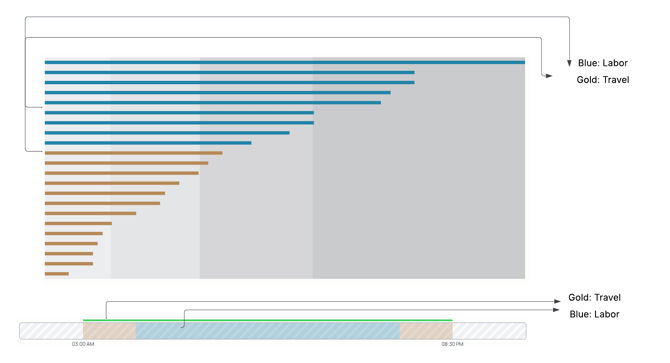
When viewing time data, there are two colors that appear across all of Spearhead's visualization tools:
Support Desk: An automated chatflow that submits a help ticket to Spearhead's support; used by clients to submit errors and ask questions.
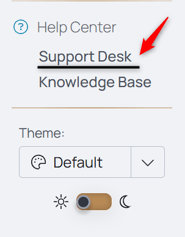
Knowledge Base: A digital repository of guides and documentation for how to navigate and use Spearhead.