
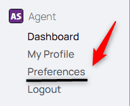
1. From the nav menu, under Profile, select Preferences.
2. From the middle menu, select Notification Preferences.

3. Choose between Email and Push, or select both. You can apply the setting to all fields with the check box on the top or individually select each field.

4. Select save to apply your new preferences.
Email:
When an event is created or updated, the user will receive an email notifying them.
Push:
When an event is created or updated, the user will receive a notification on their device regardless of if Spearhead is open or closed.
If a mobile device, be sure you have your Push notifications on for Spearhead/Web browser to enable them even when not in Spearhead.