
Follow these steps to generate a report from a ticket:
1. Navigate to your dashboard from Spearhead.
2. Select the ticket.
3. Expand the More menu, using this button.

4. From the expanded menu, select Create Report.
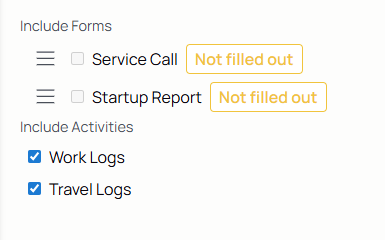
5. Select the forms and activities to be included in the report.
6. View the report from the preview window and use the Export to PDF button to download the report.
7. It will take you to the generated reports page. The new one is at the top, use the ticket number to verify.
8. Click the Download icon to view, save, and access the report.

Generate an Agent's Service Report
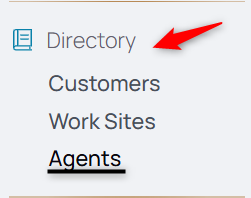
1. From the nav menu, select Agents under Directory.
2. Select the agent from the list or use the search facets to locate them.
3. Use the middle menu and select service report.

4. Select the date of the report. Use the checkbox Multi-Day Report to cover a range of days.
5. Select the customer from the dropdown field. If they're only dedicated to one customer, it's greyed out.
6. Enable the Yes or No for the media inclusion on the report.
7. View the report from the preview window and use the Export to PDF button to download the report.
8. It will take you to the generated reports page. The new one is at the top, use the ticket number to verify.
9. Click the Download icon to view, save, and access the report.
Generate a Customer's Service Report
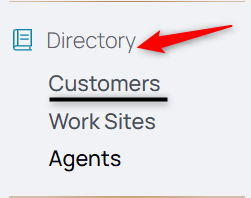
1. From the nav menu, select Customers under Directory.
2. Select the customer from the list or use the search facets to locate them.
3. Use the middle menu and select service report.

4. Select the date of the report. Use the checkbox Multi-Day Report to cover a range of days.
5. Select the agent from the dropdown field.
6. Enable the Yes or No for the media inclusion on the report.
7. View the report from the preview window and use the Export to PDF button to download the report.
8. It will take you to the generated reports page. The new one is at the top, use the ticket number to verify.
9. Click the Download icon to view, save, and access the report.