Once an agent has completed work on a ticket (logging labor, expenses, mileage, etc.), it can be submitted for review. It is then on the supervisor or back office users of an organization to approve it to facilitate invoicing and pass on to the customer. Or reject it and submit it back to the agent's workflow to rectify any errors or inconsistencies that caused the ticket's rejection.
From the ticket's middle menu, view the Review tab:

A dialog box informs the agent that once they have submitted the ticket for review, it can't be edited unless the review is cancelled by the agent or rejected by the backoffice.
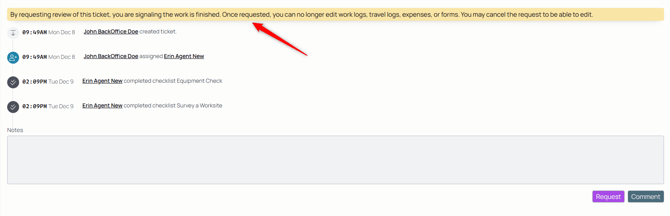
Submit the ticket for review with the Request button.
Once the ticket has been entered into review, a back office agent will either approve or reject it. If rejecting it, a comment is necessary so the agent can fix the error.

While in review, a ticket is is locked. No role can make edits or changes to logs or work on the ticket until it is open again for either the back office or agent(s) assigned to make the appropriate changes.
If the ticket's review status has not been changed, but a change is required, the agent can cancel the review from the review tab or the back office user can reject the review.
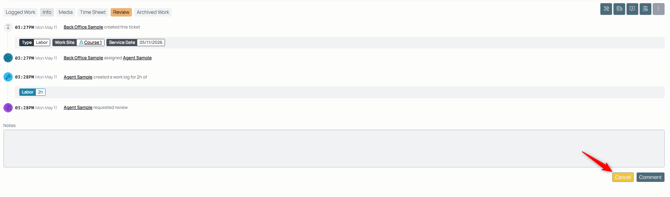
To avoid waiting on the agent to put back into review if it's been rejected then fixed by backoffice, a backoffice role can force the review through to allow for approval.

If rejected, the ticket re-enters the agent's workflow for them to correct the error or modify the entries in the ticket.

This triggers a notification to the agent and puts it back in their workflow so they can make necessary changes to have the ticket approved.
If this is a closed-by-completion work order, closing the ticket also closes its parent work order.
To reopen a ticket that's been submitted for the review process and approved, use the ellipses icon to open up the menu:

Use the Reopen Ticket option to allow for activity on the ticket again.