
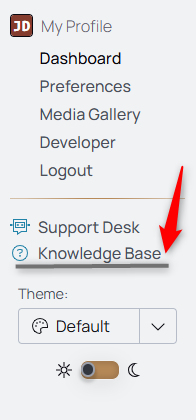
Use Spearhead's Knowledge Base, a repository of helpful articles for navigating and functioning within Spearhead, to learn more about all of Spearhead's features.
You can access it from this URL: https://docs.spearheadops.com/ or your nav menu in Spearhead.
Agent:
When an agent logs work, they use a different icon configuration.
Learn which steps to follow to add to a ticket's activity log:
- How to Add to a Ticket - Agent
- Follow these steps to add work or travel to a ticket
- Follow these steps to add expenses to a ticket
- How to Complete a Checklist - Agent
- Follow these steps
Supervisor and Back Office:
Supervisors can add two different types of work orders to an agent's workflow.
Learn about the distinctions between these types here:
Learn about how to create and add to each type of work order:
- How to Create a Closed by Completion Work Order
- Follow these steps to create a call-off ticket
- How to Create a Closed by Date Work Order
- Follow these steps to create a work order to which dedicated agents and supervisors can add tickets
- How to Create a Work Order
- How to Add a Ticket to a Closed by Date Work Order
- Follow these steps
- How to Add Ticket to an Open Work Order
- Follow these steps
Back Office:
An expansion of back office's organization settings allows for agent-tiered pricing, the creation of ticket types, checklists, and the inclusion of reference documents for ticket types. Learn more about those feature additions here:
- Agent Tiered Pricing
- Learn more about setting up agent tiered pricing
- Follow these steps to set up agent tiered pricing
- Learn more about editing agent tiers
- Follow these steps to edit agent tiers
- Learn more about adding an agent to a price tier
- Follow these steps to add an agent to a price tier
- Learn more about setting up agent tiered pricing
- Ticket Types
- Learn more about creating ticket types
- Follow these steps to create a ticket type
- Learn more about creating ticket types
- Checklists
- Learn more about creating checklists
- Follow these steps to create a checklist
- Learn more about how to attach a checklist to a ticket type
- Follow these steps to attach a checklist to a ticket type
- Learn more about creating checklists
- Reference Library
- Learn more about how to attach reference library docs to a ticket type
- Follow these steps to attach reference library docs to a ticket type
- Learn more about how to attach reference library docs to a ticket type